Install an ELD device
Last updated 2 months ago
Overview
To use Route One ELD, you need two things: the ELD hardware device installed in your truck, and the Driver App on your phone or tablet. The hardware plugs into your truck's diagnostic port and feeds engine data to the app — it's not your phone, it stays in the vehicle.
Route One ELD is compatible with two hardware devices: IOSIX and PT30. Don't have an ELD device yet? Shop now
Install the hardware
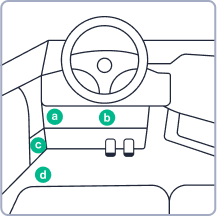
Locate the diagnostic port. The diagnostic port (OBD-II / J-Bus) is located inside the vehicle's cabin. Common locations include:
Under the left side of the dashboard
Under the steering wheel column
Near or under the driver's seat
Plug in the hardware in the diagnostic port. Insert the ELD into the diagnostic port until it locks into place.
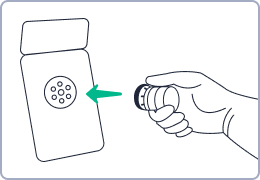
Make sure it's fully seated. A loose connection can cause engine sync failures, which will appear as a malfunction in the Driver App and may affect HOS records.
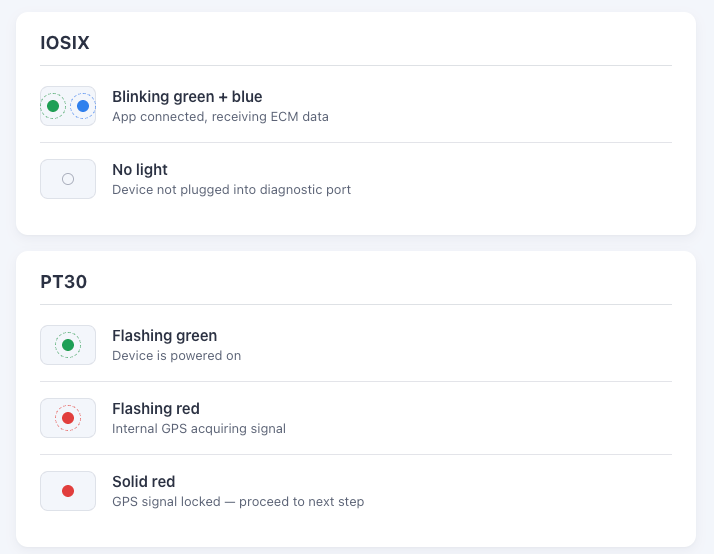
Once plugged in, the ELD will begin syncing with the vehicle's Engine Control Module (ECM). Use the LED indicators to confirm its status.